DeniedPixels: Local AI image filter for private, in-browser content control
DeniedPixels, from DeniedPixels, is a Firefox extension that filters explicit visual content using local processing to protect user privacy. The extension analyzes images and videos as they load and applies censorship according to user preferences. It targets users who want to avoid NSFW imagery on shared or professional devices while keeping analysis confined to the local machine. Settings let individuals tailor sensitivity and enforcement to their browsing habits and exposure risk.
What the extension actually does in the browser
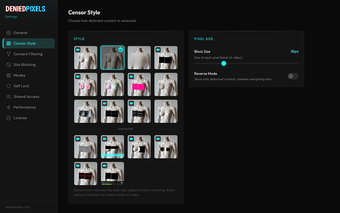
DeniedPixels operates as an in‑browser image and video filter that detects explicit visual content and obscures it before display. The tool inspects media elements on pages and applies obfuscation in-line, handling animated GIFs and embedded video as part of page load processing. It supports per-site blocking controls so users can control behavior on social feeds and media sites without relying on external services.
How detection and enforcement are implemented
The extension uses on‑device AI models to identify NSFW imagery, performing analysis in real time with local runtime support. Detection modes include progressive degradation and interactive challenge behaviors that change how filtered content is presented. These modes are designed to adjust enforcement style rather than change the underlying classification approach, which remains a local, model-driven scan of image frames and GIFs.
Does it keep visual data private and what that means
Processing runs entirely on the user’s device, so analyzed images, browsing URLs, and visual data are not sent to remote servers. The developer emphasizes a local-first model to avoid external transmission of media. The team behind the extension positions itself around privacy-focused, on-device moderation methods and associates the project with that development approach.
Performance impact, configuration, and platform fit
Real-time media analysis can use noticeable CPU on older systems, and users report greater load on media-heavy pages; the developer suggests reducing unnecessary page elements to limit processing. Configuration covers detection sensitivity, custom detection zones, and site-level whitelists and blacklists, making the tool adaptable but requiring some setup to minimize false positives. The extension is built for Firefox and remains appropriate for users who can accept a measurable performance trade-off for local filtering.
Suitable for privacy-minded users who accept a performance trade-off
DeniedPixels is a pragmatic choice for people who prioritize keeping visual analysis on-device and need enforceable content controls in the browser. Expect a noticeable CPU impact on older machines and allow time for tuning sensitivity and site rules before wide deployment. For those willing to trade some responsiveness for stronger local control over image exposure, the app delivers a practical, privacy-centered option.